 sprout
docs / operator-deploy
Operator deploy
On this page
- Prerequisites
- Quick start (local smoke)
- Gateway Docker image
- Architecture
- Defaults
- Dual network attach
- One-click Coolify (Docker Compose Empty)
- Production-shaped deploy (external / Coolify Traefik)
- Per-preview access gate (preview.auth)
- Wildcard preview certificate (DNS-01)
- Opt-in wildcard mode (gateway-declared domains)
- Prerequisites (secrets / access — not in this repo)
- Choose a path
- Runbook
- Managed Traefik notes (Coolify and similar)
- Verification (zero LE orders per deploy)
- Preview mail (Mailpit)
- How the mailbox is protected
- Dashboard (read-only, opt-in)
- Env var reference
- Compose project (compose.env)
- Optional gateway tuning (host .env / non-compose)
- Preview caps and connection budget
- Install telemetry
- Postgres preview role
- Bootstrap admin token
- Worktree DB (local provisioner)
- Upgrade / redeploy
- Teardown
- Smoke checklist
- Troubleshooting
- See also
Deploy Postgres, the sprout gateway, and Traefik once per
environment. Adopting repos then call sprout deploy / sprout teardown
from CI — no per-repo server setup. Each section below is one task.
Prerequisites
- Docker Engine with Compose v2 (
docker compose) - Host access to publish ports (local smoke defaults: gateway
7331, Traefik HTTP8880) — or readiness to join existing Docker networks for production - For production-shaped deploys: an existing Traefik and/or Postgres to attach to (Coolify-managed Traefik is fine; sprout does not call Coolify)
- Bun is not required for the compose path (image build uses the
oven/bunbase). Bun is only needed for hostbun run dev.
Quick start (local smoke)
Bring up the reference stack from the repo root:
cp compose.env.example compose.env
# Edit POSTGRES_PASSWORD, SPROUT_PREVIEW_POSTGRES_URL (keep in sync), SPROUT_PG_PASSWORD.
# URL-encode special characters in the DSN password.

docker compose --env-file compose.env up -d --build
docker compose --env-file compose.env ps
curl -sf http://127.0.0.1:7331/healthz
# Traefik HTTP entrypoint (host port TRAEFIK_HTTP_PORT, default 8880)
curl -sf http://127.0.0.1:${TRAEFIK_HTTP_PORT:-8880}/ || true
compose.env is the compose project env. Do not copy it to .env —
.env / .env.example are for the gateway process on the host (bun run dev).
The stack in docker-compose.yml is the reference operator compose
stack for local development and CI smoke. The E2E acceptance harness
(e2e/) runs the same file with --env-file e2e/compose.e2e.env — see
e2e/README.md or bun run test:e2e. Default network
names (sprout-traefik, sprout-postgres) are project-local so a smoke
up does not collide with an existing Coolify Traefik network named
traefik. Host ports are SPROUT_GATEWAY_HOST_PORT (default 7331) and
TRAEFIK_HTTP_PORT (default 8880); the harness ports come from
e2e/compose.e2e.env.
Gateway Docker image
Ship one image, one process (root Dockerfile). The image also embeds the
sprout CLI (same Bun lockfile / version pin as the gateway) so operators
can docker exec against localhost without a host-side install. Compose
builds it via build: .; build and tag it alone for registry push or
external orchestrators:
# From the repo root (reproducible with Bun 1.4.0 base + frozen lockfile)
docker build -t ghcr.io/simpros/sprout:0.9.0 \
  --build-arg SPROUT_VERSION=0.9.0 \
  .
# Optional: push after docker login to GHCR (or your registry)
# docker push ghcr.io/simpros/sprout:0.9.0
Image label org.opencontainers.image.version mirrors SPROUT_VERSION
(Dockerfile default tracks the monorepo pin; prefer a published release tag
such as v0.9.0 / image :0.9.0 in production). Pin operators and CI to a
release tag or GHCR digest — not an untagged local build — when publishing
previews.
Architecture
Route PR traffic through the three services:
                    ┌─────────────┐
   PR traffic ─────►│   Traefik   │  network: $SPROUT_TRAEFIK_NETWORK
                    │  (labels)   │
                    └──────┬──────┘
                           │ preview app containers
                    ┌──────▼──────┐
                    │   gateway   │  networks: traefik + postgres
                    │  (sprout)   │  + Docker socket
                    └──────┬──────┘
                           │ CREATE/DROP DATABASE (admin)
                    ┌──────▼──────┐
                    │  Postgres   │  network: $SPROUT_POSTGRES_NETWORK
                    │  (shared)   │
└─────────────┘- Postgres hosts all preview logical databases
(
sprout_<slug>_pr<id>). - Gateway administers databases, starts preview containers, and sets Traefik routing labels. It mounts the Docker socket and joins both networks.
- Traefik terminates HTTP for preview hostnames. Preview app containers
attach only to
traefik+postgres; seed containers attach topostgresonly.
Defaults
Durable runtime identity uses product sprout* names:
| What | Default |
|---|---|
| Compose project / volumes | sprout / sprout_* |
| Control-plane SQLite | /data/sprout.db (compose) / sprout.db (host) |
| Bootstrap admin token file | SPROUT_ADMIN_TOKEN_PATH (/data/admin-token compose/image; admin-token host default); mode 0600 |
| Traefik network | sprout-traefik |
| Postgres network | sprout-postgres |
| Preview Postgres roles | sprout_admin / sprout_preview |
| Preview container names | sprout-<slug>-pr-<id> |
| Preview database names | sprout_<slug>_pr<id> |
Dual network attach
Point the gateway at two Docker network names:
| Variable | Purpose |
|---|---|
SPROUT_TRAEFIK_NETWORK | Network shared with Traefik. Preview app containers join this network so Traefik can route traffic via Docker labels. |
SPROUT_POSTGRES_NETWORK | Network shared with Postgres. Gateway, preview app, and seed containers join this network so they can reach the database by hostname. |
Compose declares both networks with name: ${SPROUT_…} so the same
variable is the single source for the Docker network name and the gateway
env (defaults are project-local):
networks:
  traefik:
    name: ${SPROUT_TRAEFIK_NETWORK:-sprout-traefik}
  postgres:
    name: ${SPROUT_POSTGRES_NETWORK:-sprout-postgres}
When the gateway creates a Postgres preview app container it attaches
both networks. Postgres seed containers get Postgres only — they
never need Traefik reachability. SQLite preview containers (app, services,
seed) mount their named volume instead and join Traefik only; a
SQLite-only gateway needs no SPROUT_POSTGRES_NETWORK at all.
One-click Coolify (Docker Compose Empty)
Stand up a gateway with its own Postgres inside Coolify. Paste
deploy/coolify/gateway.compose.yml
and follow deploy/coolify/README.md
(wildcard DNS, preview hostname template, optional mail/forwardAuth). Both
SPROUT_TRAEFIK_NETWORK and SPROUT_POSTGRES_NETWORK point at the
predefined external coolify network — the only name known at template
time that the Coolify proxy (coolify-proxy) is attached to.
Production-shaped deploy (external / Coolify Traefik)
Coexist with an externally managed Traefik (including Coolify's) without forking the reference file. sprout does not manage Traefik or call the Coolify API. It registers routes by setting standard Traefik Docker labels on preview app containers. Use the overlay:
- Set
SPROUT_TRAEFIK_NETWORK/SPROUT_POSTGRES_NETWORKincompose.envto the existing network names (Coolify's predefined shared network iscoolify). - For HTTPS routers, set Traefik TLS knobs to match that proxy — e.g.
SPROUT_TRAEFIK_ENTRYPOINTS=httpsand optionallySPROUT_TRAEFIK_CERTRESOLVER=letsencrypton Coolify (HTTP-01 is fine for small fleets). If a single wildcard / DNS-01 is needed for rate limits or fleet growth, follow Wildcard preview certificate (DNS-01) — often the nameletsencryptis kept after converting that resolver. Leave both unset for HTTP-only Traefik (bundled compose / local). Empty entrypoints keeps TLS off even if certresolver is set. - For an SSO gate on preview hosts (Traefik forwardAuth), set both
SPROUT_TRAEFIK_MIDDLEWARES(a single name, e.g.voidauth) andSPROUT_FORWARDAUTH_ADDRESS(a URL Traefik can reach). The gateway emits the middleware definition and the router attachment as Docker labels — no Traefik static/file config. Leave both empty for open previews. - Ensure those networks exist (
docker network create …if needed). - Bring up only the gateway against external networks:
docker compose -f docker-compose.yml -f docker-compose.external.yml \
  --env-file compose.env up -d --build gateway
The overlay marks both networks external: true and disables the bundled
traefik / postgres services (via profiles). Point
SPROUT_PREVIEW_POSTGRES_URL at the external Postgres admin DSN.
Also set SPROUT_PG_HOST (and SPROUT_PG_PORT if not 5432) to the
hostname preview app and seed containers use to reach Postgres on
SPROUT_POSTGRES_NETWORK. That is often different from the host in the
admin DSN (dual-homed setups). The bundled default postgres only works
when a service with that DNS name exists on the network.
The gateway creates or syncs the preview login (SPROUT_PG_USER /
SPROUT_PG_PASSWORD) on boot from the admin DSN — no manual CREATE ROLE
and no compose one-shot. The admin role needs CREATEROLE (or superuser);
otherwise boot fails with a clear error.
Also ensure the external Traefik has --providers.docker=true and
--providers.docker.exposedbydefault=false (or equivalent) so only
labelled containers are published.
Label conventions the gateway applies:
traefik.enable=truetraefik.http.routers.<name>.rule=Host(\`)` traefik.http.services.<name>.loadbalancer.server.port=<port>
When TLS is enabled (SPROUT_TRAEFIK_ENTRYPOINTS non-empty), also:
traefik.http.routers.<name>.tls=truetraefik.http.routers.<name>.entrypoints=<SPROUT_TRAEFIK_ENTRYPOINTS>traefik.http.routers.<name>.tls.certresolver=<SPROUT_TRAEFIK_CERTRESOLVER>(only when certresolver is set)
TLS is opt-in: unset/blank entrypoints → HTTP labels only (works with the
bundled Traefik web entrypoint). Entrypoints without certresolver uses
Traefik's default/builtin cert. Entrypoint and certresolver names are
not Coolify-specific — set them to match the Traefik in use (e.g.
Coolify often uses https + letsencrypt; stock Traefik quickstarts often
use websecure + a custom resolver name).
When forwardAuth is enabled (both SPROUT_TRAEFIK_MIDDLEWARES and
SPROUT_FORWARDAUTH_ADDRESS non-empty), also:
traefik.http.routers.<name>.middlewares=<SPROUT_TRAEFIK_MIDDLEWARES>traefik.http.middlewares.<mw>.forwardauth.address=<SPROUT_FORWARDAUTH_ADDRESS>traefik.http.middlewares.<mw>.forwardauth.trustForwardHeader=truetraefik.http.middlewares.<mw>.forwardauth.authResponseHeaders=Remote-User,Remote-Email,Remote-Groups
(<mw> is the single middleware name from SPROUT_TRAEFIK_MIDDLEWARES.)
ForwardAuth is opt-in and Coolify-safe: Coolify's Traefik uses the Docker
provider only, so sprout must emit both the middleware definition and
the router attachment on preview containers (no Traefik file/static
config). Both env vars must be set together (or both empty); setting only
one fails at gateway boot. SPROUT_TRAEFIK_MIDDLEWARES is one name
(commas rejected).
Per-repo alternative: adopting repos can attach their own previews to
Traefik routers or middlewares defined outside the gateway with
preview.labels / preview.services[].labels in .sprout.yaml (see
Preview labels).
The gateway-wide knobs above change every preview on the gateway; the
manifest keys change one repo's previews. Gateway-emitted keys stay
reserved — a manifest key colliding with one fails the deploy fast instead
of silently overriding routing.
VoidAuth / SSO setup: add the preview domain (e.g.
*.internal.example.com) in the VoidAuth UI, then point
SPROUT_FORWARDAUTH_ADDRESS at the forward-auth endpoint (e.g.
https://auth.example.com/api/authz/forward-auth). That URL must be
reachable from Traefik (not only from browsers). Unauthenticated visits
redirect to login; authenticated visits reach the preview app.
Coolify-managed Traefik already watches the Docker socket; sprout preview containers appear alongside Coolify apps as long as they share the Traefik network.
Per-preview access gate (preview.auth)
Offer adopters the per-repo opt-in (preview.auth: basic | link, see
Previews). basic needs nothing from the
operator. link needs both SPROUT_PREVIEW_AUTH_SECRET (HMAC root for
shareable tokens) and SPROUT_PREVIEW_AUTH_ADDRESS (the gateway's
in-network forwardAuth URL, e.g.
http://gateway:7331/v1/internal/preview-auth) — set together or both
empty; a partial set fails gateway boot naming the missing key. The address
must be Traefik-reachable without leaving the Docker network: that is the
whole point (an external auth service has no Cloudflare-free path to the
preview edge, and Cloudflare rewrites X-Forwarded-Host, so an external
gate authorised everything). Never point it at a public URL.
Wildcard preview certificate (DNS-01)
Stop per-preview Let's Encrypt issuance under fleet growth. Per-preview
certs hit the 50 certificates / registered domain / week rate limit
under fleet growth or ACME-store wipes. One wildcard on the preview domain
(*.previews.example.com) removes per-deploy issuance: Traefik serves the
stored cert for every preview host without ordering a new one.
sprout still emits optional tls.certresolver labels (#102). Traefik
resolves via that named resolver and must find a covering cert in
that resolver's store. With *.PREVIEW_DOMAIN already there, Traefik
should log a store hit / No ACME certificate generation required for the
preview FQDN — not a new LE order. Wrong resolver name → per-host orders
resume (the rate-limit failure mode).
Opt-in wildcard mode (gateway-declared domains)
Off by default. Set SPROUT_TRAEFIK_WILDCARD_TLS=true and the gateway's
preview routers additionally declare
tls.domains[0].main=*.<suffix> + tls.domains[0].sans=<suffix>, where
<suffix> is the workload's hostname with its first label removed
(pr-42.a.previews.example.com → a.previews.example.com). The requested
set equals the bootstrap compose's shape (wildcard main + apex SAN), so a
hand-bootstrapped wildcard is reused instead of duplicated, and companion
services under the same suffix emit the same set (Traefik deduplicates by
domain set — one order serves all of them).
Prerequisites:
SPROUT_TRAEFIK_CERTRESOLVERmust be set (boot fails without it), and that resolver must use DNS-01 — a wildcard can only be validated over DNS-01, never over HTTP-01. Pointing this mode at an HTTP-01 resolver leaves routers asking for a certificate the resolver can never issue (boot logs a warning naming this section because the challenge type is outside sprout's view).- A wildcard covers exactly one label: a preview host two levels below
the zone (
pr-42.a.previews.example.com) needs*.a.previews.example.com, not*.previews.example.com— one wildcard per adopter suffix, ordered once per suffix on first deploy. - Hostnames too short to derive a suffix (fewer than two remaining labels) fail the deploy instead of emitting a broken wildcard.
With the flag off, emitted labels are byte-identical to today.
Ready-to-apply fragments (placeholders only):
deploy/traefik/README.md.
Prerequisites (secrets / access — not in this repo)
Collect these before the runbook; the repo ships fragments only:
| Need | Why |
|---|---|
| DNS provider API credentials for the preview zone | Traefik dnsChallenge must create/delete _acme-challenge TXT records |
| Write access to Traefik static config (or managed-proxy UI equivalent) | Convert or add a dnsChallenge certificates resolver + durable ACME storage |
| Ability to inject provider env vars into the Traefik process | Provider plugins read tokens from the environment (names are provider-specific) |
| Durable volume (or equivalent) for ACME storage | Cert + account must survive Traefik restarts/upgrades |
Do not invent provider field names here — look up Traefik's docs for the
DNS provider in use. Fill placeholders in
deploy/traefik/certificates-resolver.dns.yml
for the resolver body used in step 2.
Choose a path
| Path | When | Gateway certresolver |
|---|---|---|
| Default (simple) | Traefik's job for this zone is preview TLS, or DNS API creds already cover every host Traefik terminates | Keep existing name (e.g. letsencrypt) |
| Coexistence (optional) | Coexistence with HTTP-01 for other apps must remain | Point sprout at the new DNS-01 name (e.g. letsencrypt-dns) |
Runbook
Identify the DNS provider for the preview domain (the zone that serves
*.previews.example.com). Create API credentials with permission to manage TXT records for ACME. Record the Traefik provider name and required env vars from Traefik's DNS Providers list.Resolver setup — pick one branch from the table above:
Default — convert in place. In Traefik static config (or Coolify proxy settings), replace the existing resolver's
httpChallengeblock with thednsChallengeshape fromdeploy/traefik/certificates-resolver.dns.yml(same key, oftenletsencrypt; keep the same durablestoragepath). Converting replaces the challenge type for every consumer of that resolver name — if any other app must stay on HTTP-01, stop and use coexistence instead. Inject<DNS_PROVIDER_ENV_*>into the Traefik process. No second resolver, no secondacme.json, no rename dance.Coexistence — add a second resolver. Traefik requires one storage file per certificates resolver — reusing the HTTP-01 path (e.g.
/data/acme.json) causes init conflicts or a corrupted store. Copy the fragment body under a new key (e.g.letsencrypt-dns:), setstorageto a distinct path (e.g./data/acme-dns.json), and leave the HTTP-01 resolver untouched. Paste under the existingcertificatesResolvers:map (do not overwrite the whole static ACME document). Merged shape:certificatesResolvers: letsencrypt: # existing HTTP-01 — leave as-is acme: email: "<ACME_EMAIL>" storage: "/data/acme.json" # HTTP-01 store httpChallenge: entryPoint: http letsencrypt-dns: # fragment body under a new key acme: email: "<ACME_EMAIL>" storage: "/data/acme-dns.json" # MUST differ from HTTP-01 dnsChallenge: provider: "<DNS_PROVIDER>"Inject
<DNS_PROVIDER_ENV_*>into the Traefik container/process.
Issue the wildcard once with a temporary router, then remove it. The cert stays in the ACME store. Set
CERTRESOLVER_NAMEto the DNS-01 resolver from step 2 (letsencrypton default;letsencrypt-dnson coexistence). Compose fails closed if required env is unset:export PREVIEW_DOMAIN=previews.example.com # your preview base domain export TRAEFIK_NETWORK=traefik # shared Docker network export CERTRESOLVER_NAME=letsencrypt # match step 2 resolver export HTTPS_ENTRYPOINT=https # match your Traefik docker compose -f deploy/traefik/wildcard-bootstrap.compose.yml up -d # Wait until Traefik logs show successful ACME obtain for # *.${PREVIEW_DOMAIN} (and the apex SAN). Then: docker compose -f deploy/traefik/wildcard-bootstrap.compose.yml downThe bootstrap compose attaches
tls.domains[0].main=*.${PREVIEW_DOMAIN}so Traefik requests a wildcard (DNS-01), not a single-host cert forbootstrap.*.Point sprout at that resolver (names must match Traefik). Default keeps Coolify quickstart unchanged; coexistence points at the new name:
# compose.env / gateway env
SPROUT_TRAEFIK_ENTRYPOINTS=https
SPROUT_TRAEFIK_CERTRESOLVER=letsencrypt       # or letsencrypt-dns on coexistence
Deploy a preview. Traefik should terminate TLS with the stored wildcard; no new LE order for that hostname (store hit /
No ACME certificate generation requiredin Traefik ACME logs). Other Coolify apps can keep usingletsencrypt(HTTP-01) on the coexistence path; preview hosts must use the resolver that holds*.PREVIEW_DOMAIN.Monitor renewal. Let's Encrypt wildcards renew before expiry (~30 days out). Confirm Traefik still has DNS credentials and that ACME storage is writable (the DNS-01 resolver's path — coexistence: the distinct second file). Optionally dry-run against the staging CA (
caServer) on a non-prod Traefik first.
Managed Traefik notes (Coolify and similar)
sprout does not configure Coolify's proxy. On a managed Traefik:
- Find where that product exposes certificates resolvers / ACME storage
(static config, UI, or generated compose). A
dnsChallengeresolver is needed there — Docker labels alone cannot add one. - Prefer converting the existing resolver when this Traefik only terminates hosts the DNS creds cover; use the coexistence branch only when HTTP-01 must remain for other apps.
- Ensure every ACME JSON path is on persistent storage, not an ephemeral container filesystem. Dual resolvers need two durable files.
- Provider credentials belong in the proxy environment, not in sprout gateway env.
- Gateway knobs stay the same:
SPROUT_TRAEFIK_ENTRYPOINTS+SPROUT_TRAEFIK_CERTRESOLVERmust match the managed proxy's entrypoint and the resolver that holds the wildcard. If the managed proxy cannot add or convert to DNS-01, per-host issuance and rate limits remain.
Verification (zero LE orders per deploy)
After the wildcard is in the store:
| Check | How |
|---|---|
| Wildcard present in ACME store | Inspect the DNS-01 resolver's storage path (or Traefik API / dashboard certificates) for *.previews.example.com (and apex SAN if requested). |
| ACME survives restart | Restart Traefik; confirm the same store file/volume still lists the wildcard; HTTPS to an existing preview host still presents that cert. |
| New preview → zero new LE orders | Note LE account order count or Traefik ACME log cursor. sprout deploy a fresh PR host. Confirm logs show a store hit / No ACME certificate generation required for that FQDN against the resolver that holds the wildcard — no Obtain / new order; openssl s_client (or browser) shows the wildcard cert (CN/SAN includes *.previews.example.com). |
| Rate-limit safety | Optional: temporarily revoke network to the DNS API and deploy again — TLS should still work from the store (renewal would fail later; issuance on deploy must not be required). |
Acceptance from #105: new preview deploys order zero LE certificates (store hit); ACME storage survives Traefik restarts/upgrades; renewal observed or staging dry-run verified.
Preview mail (Mailpit)
Give previews a shared mailbox. The reference compose stack ships a Mailpit
service for preview mail, and the gateway joins its mail network
(SPROUT_MAIL_NETWORK, default sprout-mail). Preview app,
companion-service, and seed containers receive the canonical MAIL* env
(see Previews) and join that network,
so they reach Mailpit by hostname. Mail is never provisioned per preview:
one shared Mailpit, one shared inbox for the whole gateway.
Point at an external Mailpit (a Mailpit running outside the preview networks, or a long-lived instance shared across environments):
- Set
SPROUT_MAIL_HOSTto the hostname preview containers use to reach it onSPROUT_MAIL_NETWORK— a container-network DNS name, mirroring howSPROUT_PG_HOSTnames Postgres. That is often different from the host an operator's browser uses. - Set
SPROUT_MAIL_NETWORKto the Docker network Mailpit is attached to (create it first if needed). Preview app containers join it alongside Traefik (+ Postgres forpostgrespreviews); seed containers join it whenever a seed can run. - Set
SPROUT_MAIL_UI_URLto the inbox URL humans open (surfaced in the MR note,sprout list, and deploy output). - Leave
SPROUT_MAIL_PORTat1025unless the instance listens elsewhere; leaveSPROUT_MAIL_USER/SPROUT_MAIL_PASSWORDempty when Mailpit accepts any credentials (the bundled service does —MP_SMTP_AUTH_ACCEPT_ANY=1), otherwise set both.
Unset group = no mail: with no SPROUT_MAIL_* set, previews deploy
without mail env. Setting any of them without SPROUT_MAIL_HOST fails
gateway boot (Incomplete mail configuration: missing SPROUT_MAIL_HOST).
How the mailbox is protected
Treat the mailbox as internal. The bundled compose publishes Mailpit's UI
(8025) and SMTP (1025) on host ports for local smoke; in production:
- Put basic auth on the Mailpit UI and API with Mailpit's own knobs
(
MP_UI_AUTHasuser:password, orMP_UI_AUTH_FILEpointing at a file holding it) and restrict serving withMP_ALLOWED_HOSTS— see the Mailpit docs for exact semantics. - Do not publish the SMTP port beyond the preview networks; previews reach
it over
SPROUT_MAIL_NETWORK, browsers need only the UI. - Never use a preview to send real customer mail. The default
SPROUT_MAIL_FROM_DOMAIN=preview.invalidis a reserved suffix that can never deliver for real — keep it unless the fleet has a dedicated, clearly test-only domain.
Dashboard (read-only, opt-in)
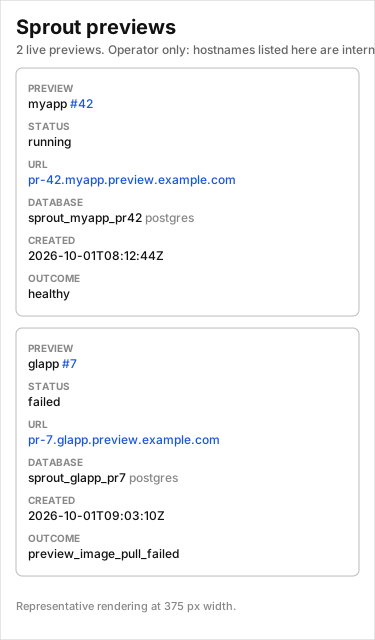
Serve a human-readable page of live previews at GET /dashboard — one row
per preview with repository slug, PR id linked to the forge PR, status,
clickable preview URL, database name and provider, created and last-deploy
timestamps, mail identity when mail is configured, and the last deploy
outcome or error code. It renders from the same state the
GET /v1/previews read surface reads, costs one state query per request
regardless of preview count (no per-preview container inspection), and ships
as server-rendered HTML with inline styles only: no frontend toolchain, no
JavaScript, no external asset fetch.
Operator-only: the page lists every preview hostname on the gateway, so it is off by default and protected by its own HTTP basic credentials — never shared links, never unauthenticated. Enabling it without credentials fails gateway boot instead of serving a public page.
SPROUT_DASHBOARD_ENABLED=true
SPROUT_DASHBOARD_AUTH=basic
SPROUT_DASHBOARD_USER=operator
SPROUT_DASHBOARD_PASSWORD=change-me-dashboard
# Optional: serve only behind your own proxy hostname + certificate.
# Requests to any other Host get 404, as if the flag were off.
# SPROUT_DASHBOARD_HOST=previews-status.example.com
With the flag unset or false, /dashboard is 404 and the response
surface is unchanged. The page is read-only by construction: only GET is
reachable, and it carries no write controls and no token, password, or
credential material.
Env var reference
Set gateway env from this table. Canonical compose keys live in
compose.env.example. Host bun run dev uses
.env.example (same gateway names; different defaults
for host networking). Keep POSTGRES_* and
SPROUT_PREVIEW_POSTGRES_URL in sync in compose.env; do not synthesize
the DSN from the raw password in YAML.
Compose project (compose.env)
| Variable | Required | Description |
|---|---|---|
POSTGRES_USER | yes (bundled) | Postgres image bootstrap user (default sprout_admin) |
POSTGRES_PASSWORD | yes (bundled) | Must match the password embedded in SPROUT_PREVIEW_POSTGRES_URL |
POSTGRES_DB | no | Bootstrap DB (default postgres) |
SPROUT_PREVIEW_POSTGRES_URL | postgres previews | Admin DSN for role ensure, CREATE DATABASE, DROP DATABASE (needs CREATEROLE or superuser). URL-encode special chars in the password. A gateway that only serves sqlite previews boots without it. |
SPROUT_PG_HOST | postgres previews | Hostname preview app+seed containers use for PGHOST on SPROUT_POSTGRES_NETWORK (bundled: postgres) |
SPROUT_PG_PORT | no | PGPORT for preview containers (default 5432) |
SPROUT_PG_USER | postgres previews | Static preview login; gateway ensures it exists |
SPROUT_PG_PASSWORD | postgres previews | Preview PGPASSWORD; synced onto the role on every gateway boot |
SPROUT_TRAEFIK_NETWORK | yes | Docker network name for Traefik-facing containers |
SPROUT_POSTGRES_NETWORK | postgres previews | Docker network name for database reachability |
SPROUT_MAIL_HOST | mail previews | Mailpit hostname preview containers use on SPROUT_MAIL_NETWORK (bundled: mailpit). Any other SPROUT_MAIL_* set without it fails boot (Incomplete mail configuration: missing SPROUT_MAIL_HOST); unset group = no mail env injected |
SPROUT_MAIL_PORT | no | MAILPORT for preview containers (default 1025) |
SPROUT_MAIL_USER / SPROUT_MAIL_PASSWORD | no | Optional credentials (MAILUSER / MAILPASSWORD); omitted keys are not injected at all. Leave empty when Mailpit accepts any credentials |
SPROUT_MAIL_SECURE | no | true/false (1/0, yes/no accepted; default false). MAILSECURE=true is injected only when true; anything else fails boot |
SPROUT_MAIL_NETWORK | mail previews | Extra Docker network preview app (+ seed, when seedable) containers join to reach Mailpit (mirrors SPROUT_POSTGRES_NETWORK) |
SPROUT_MAIL_UI_URL | no | Inbox URL for humans — MR note Mailbox: line, sprout list, deploy output — and the injected MAILUIURL (omitted when empty) |
SPROUT_MAIL_FROM_DOMAIN | no | From-domain for the per-preview identity (default preview.invalid, never deliverable) |
SPROUT_GATEWAY_HOST_PORT | no | Host port published for the gateway (default 7331) |
TRAEFIK_HTTP_PORT | no | Host port published for Traefik HTTP (default 8880) |
SPROUT_ADMIN_TOKEN | no | Pin bootstrap admin bearer; omit/blank to auto-generate |
SPROUT_STATE_DB_PATH | no | SQLite path (compose default /data/sprout.db) |
SPROUT_ADMIN_TOKEN_PATH | no | Raw admin bearer file (compose default /data/admin-token) |
SPROUT_REGISTRY_AUTHS_JSON | no | Per-host pull map {"ghcr.io":{"username":"u","password":"p"},…} |
SPROUT_REGISTRY_USER / SPROUT_REGISTRY_PASSWORD | no | Legacy single-registry fallback when image host is not in the map |
SPROUT_TRAEFIK_ENTRYPOINTS | no | Non-empty → HTTPS router labels; empty → HTTP-only |
SPROUT_TRAEFIK_CERTRESOLVER | no | Optional certresolver name when entrypoints set (required with SPROUT_TRAEFIK_WILDCARD_TLS=true) |
SPROUT_TRAEFIK_WILDCARD_TLS | no | true → preview routers declare tls.domains wildcard+apex for their suffix (DNS-01 resolver required); default false (labels unchanged) |
SPROUT_TRAEFIK_MIDDLEWARES | no | Single forwardAuth middleware name (no commas) |
SPROUT_FORWARDAUTH_ADDRESS | no | Traefik-reachable forwardAuth URL (required with middleware name) |
SPROUT_PREVIEW_AUTH_SECRET | no | HMAC root for preview.auth: link tokens (required with address) |
SPROUT_PREVIEW_AUTH_ADDRESS | no | Gateway in-network forwardAuth URL, e.g. http://gateway:7331/v1/internal/preview-auth (required with secret) |
SPROUT_DASHBOARD_ENABLED | no | true serves read-only GET /dashboard; default false (route absent, requests 404) |
SPROUT_DASHBOARD_HOST | no | Optional hostname that alone may serve the page (own proxy host + certificate); other hosts 404 |
SPROUT_DASHBOARD_AUTH | no | Protection model; empty or basic (anything else fails boot) |
SPROUT_DASHBOARD_USER / SPROUT_DASHBOARD_PASSWORD | dashboard | HTTP basic credentials; enabling without both fails boot |
SPROUT_GITHUB_TOKEN / SPROUT_GITLAB_TOKEN | no | Sweep forge PATs (may be blank at boot) |
SPROUT_FORGE_HOSTS | no | Optional host=gitlab pairs for self-managed GitLab |
SPROUT_TELEMETRY_ENDPOINT | no | Anonymous install-telemetry destination (URL). Empty = nothing is sent; must be set together with SPROUT_TELEMETRY_AUTH (see Install telemetry) |
SPROUT_TELEMETRY_AUTH | no | Credential for the install-telemetry destination. Empty = nothing is sent |
SPROUT_OTLP_ENDPOINT | no | Operator-owned OTLP/HTTP traces URL, used verbatim. Empty = no trace export; non-http(s) fails boot (see Your own trace backend) |
SPROUT_OTLP_HEADERS | no | Comma-separated name=value export headers (first = splits, base64 padding kept). Bad entries fail boot |
Forge kind is chosen per repo from the canonical URL (github.com /
gitlab.com) or SPROUT_FORGE_HOSTS — not a gateway-wide forge switch.
Registry: the deploy request carries a fully-qualified app_image; there
is no separate registry-host env. Host docker login does not help
gateway-initiated Engine API pulls — set registry auth when images are
private. Malformed SPROUT_REGISTRY_AUTHS_JSON fails at boot.
Optional gateway tuning (host .env / non-compose)
Compose pins SPROUT_PORT=7331 inside the container. These tuning knobs
are in .env.example for host runs (and may be added to compose
environment: for non-defaults):
| Variable | Default |
|---|---|
SPROUT_PORT | 7331 |
SPROUT_TTL_HOURS | 72 (legacy creation-age sweep; new governance below is off by default) |
SPROUT_SWEEP_CRON | */30 * * * * |
SPROUT_TELEMETRY | on |
SPROUT_PREVIEW_PORT_DEFAULT | 8080 |
SPROUT_SEED_TIMEOUT | 180 |
SPROUT_PREVIEW_TTL | off (7d in the self-serve compose stack) |
SPROUT_PREVIEW_IDLE_TEARDOWN | off |
SPROUT_MAX_PREVIEWS_PER_REPO | off |
SPROUT_MAX_PREVIEWS | off |
SPROUT_PREVIEW_MAX_DB_CONNECTIONS | off |
SPROUT_POSTGRES_MAX_CONNECTIONS | off (100 in the compose example) |
SPROUT_SWEEP_CRON is a cron expression (local gateway time); an invalid
value fails gateway boot. The first sweep pass lands on the next boundary
— never at boot.
Unbounded by default: with TTL/idle/caps all off the gateway keeps every
running preview until PR close and logs a loud boot warning. Rows that
never complete a deploy are still collected by the legacy creation-age
bound (SPROUT_TTL_HOURS). The self-serve compose stack sets
SPROUT_PREVIEW_TTL=7d so a new operator is safe without configuring
anything; an existing deployment upgrades with no new required env and
identical behaviour apart from that warning.
Preview caps and connection budget
Enforce caps instead of discovering overload afterwards. Exceeding
SPROUT_MAX_PREVIEWS or SPROUT_MAX_PREVIEWS_PER_REPO fails the deploy
with preview_limit_reached naming the cap, its value, and the current
count — no container and no database is created. The sweep logs over-cap
state but never deletes to fix it; close a PR or raise the cap.
Connection arithmetic the gateway enforces:
projected = (active previews + 1) × SPROUT_PREVIEW_MAX_DB_CONNECTIONS
against SPROUT_POSTGRES_MAX_CONNECTIONS. A deploy beyond the projection
fails with preview_connection_budget_exceeded. The two vars are a pair —
set both or neither; setting exactly one fails gateway boot instead of
silently enforcing nothing.
Measured case: each preview app holds two long-lived pools at default size,
so ~12 idle connections per preview; ~8 previews fill a 100-slot Postgres
instance with zero traffic (remaining connection slots are reserved for SUPERUSER, SQLSTATE 53300). Set SPROUT_PREVIEW_MAX_DB_CONNECTIONS=12
and SPROUT_POSTGRES_MAX_CONNECTIONS=100 to enforce that shape. The figure
is only accurate for apps that honour the injected cap — a repo that raises
its pool sizes bypasses the budget, and the gateway must not assume
otherwise. Raising max_connections is headroom, not a bound.
For HTTPS behind an external Traefik, set entrypoints (and optionally
certresolver) to that proxy's names. Example Coolify-shaped values
(operator choice, not sprout defaults):
SPROUT_TRAEFIK_ENTRYPOINTS=https and
SPROUT_TRAEFIK_CERTRESOLVER=letsencrypt (HTTP-01, or the same name after
a DNS-01 convert — see Wildcard preview certificate
(DNS-01); use letsencrypt-dns only
on the coexistence path).
For SSO via Traefik forwardAuth (e.g. VoidAuth), set both
SPROUT_TRAEFIK_MIDDLEWARES=voidauth and
SPROUT_FORWARDAUTH_ADDRESS=https://auth.example.com/api/authz/forward-auth.
Install telemetry
Leave the defaults unless the fleet opts out. The published image reports
anonymous installation facts and deploy outcomes to a maintainer-run
endpoint — on by default, one variable to stop (SPROUT_TELEMETRY=off,
or DO_NOT_TRACK=1). Schema, payloads, and off switches:
Telemetry.
SPROUT_TELEMETRYis the on/off knob (on/off,1/0,true/false,yes/no, case-insensitive; anything else fails boot).SPROUT_TELEMETRY_ENDPOINT+SPROUT_TELEMETRY_AUTHare the destination pair: both set means reporting is active, exactly one set fails boot, neither set means nothing is sent.- A from-source build carries no destination (the
DockerfileARGdefaults are empty), so it reports nothing until the pair is set. To opt a source build in, pass the same two variables as build args:
docker build -t sprout:local \
  --build-arg SPROUT_TELEMETRY_ENDPOINT="${SPROUT_TELEMETRY_ENDPOINT}" \
  --build-arg SPROUT_TELEMETRY_AUTH="${SPROUT_TELEMETRY_AUTH}" \
  .
The Coolify paste-file needs nothing: it pins the published image, so it inherits the image's destination env.
Two channels, two purposes: SPROUT_TELEMETRY is the anonymous upstream
channel to the maintainer. Pointing traces at your own backend is a
separate opt-in feature (SPROUT_OTLP_*, #262) — never both in one knob.
Postgres preview role
Fresh Postgres, zero SQL. Point SPROUT_PREVIEW_POSTGRES_URL at a new
instance whose admin has CREATEROLE (or is superuser), set
SPROUT_PG_USER / SPROUT_PG_PASSWORD, start the gateway — no
CREATE ROLE, no init scripts, no compose one-shot. Compose no longer
ships an ensure-preview-role service; the gateway owns role ensure on
boot (and again before each CREATE DATABASE).
If SPROUT_PG_USER is missing the gateway runs CREATE ROLE … LOGIN PASSWORD …; if present it ALTER ROLE … LOGIN PASSWORD … so password
rotation is change SPROUT_PG_PASSWORD + restart. Role names must match
the lowercase SAFE_ROLE guard. Without CREATEROLE (or superuser), boot
fails with a clear error instead of a later CREATE DATABASE … OWNER
failure.
An optional manual helper remains at
deploy/postgres/ensure-preview-role.sh for pre-provisioning without
starting the gateway.
The gateway preview-db module grants that role ownership when it creates
each sprout_<slug>_pr<id> database, and — for dual previews
(db.roles, see Adopting a
repo) — also creates a per-DB restricted companion
LOGIN (<dbName>_app) with CONNECT + schema USAGE. Containers receive
owner credentials as PGUSER/PGPASSWORD and, in dual only, companion
credentials as PGAPPUSER/PGAPPPASSWORD (remappable via preview.env —
see Adopting a repo). Teardown drops the database
then the companion role when one was provisioned.
Bootstrap admin token
Persist the admin bearer across boots. On every boot where the raw bearer
is known (pinned SPROUT_ADMIN_TOKEN, or first-time auto-generate), the
gateway writes it to SPROUT_ADMIN_TOKEN_PATH (mode 0600). Compose and
the gateway image publish SPROUT_ADMIN_TOKEN_PATH=/data/admin-token so
the embedded CLI does not guess from the SQLite path. Later boots with a
hashed-only admin require that file to still be readable (missing/empty →
boot fails). When SPROUT_ADMIN_TOKEN is unset or blank on first
generate, the raw token is also printed once in gateway logs:
docker compose --env-file compose.env logs gateway | grep -i adminCreate a deploy token for each adopting repo by exec'ing the CLI already
in the gateway image (SPROUT_URL defaults to http://127.0.0.1:7331).
Against that loopback URL the CLI resolves a bearer as: SPROUT_TOKEN →
SPROUT_ADMIN_TOKEN → SPROUT_ADMIN_TOKEN_PATH (default admin-token;
/data/admin-token in-container), so bare docker exec works for pinned
and auto-generated admin tokens:
# Primary path: CLI embedded in the gateway image (no SPROUT_TOKEN needed)
docker compose --env-file compose.env exec gateway \
  sprout admin token create --scope deploy --repo https://github.com/org/repo --slug org-repo

# Smoke the embedded CLI (no token / no SPROUT_URL needed)
docker compose --env-file compose.env exec gateway sprout health
Host-side CLI against a remote gateway still needs an explicit
SPROUT_TOKEN — admin env/file fallback is loopback-only.
Store the deploy token in the adopting repo's CI secrets as SPROUT_TOKEN.
Worktree DB (local provisioner)
Isolate per-worktree Postgres credentials for parallel agents / herdr worktrees on one machine. The CLI provisions an isolated DB + LOGIN role per worktree without talking to the gateway:
sprout worktree-db provision --slug <name> --env-file <path> --admin-url "$ADMIN_DSN"
sprout worktree-db drop --slug <name> --admin-url "$ADMIN_DSN"
Flag contract (slug normalization, object naming, env-file behavior,
--rename): CLI reference.
Upgrade / redeploy
Pull latest operator files, then rebuild + recreate:
# Pull latest operator files, then rebuild + recreate
git pull
docker compose --env-file compose.env up -d --build
curl -sf http://127.0.0.1:7331/healthz- Changing
SPROUT_PG_PASSWORD(or other role env) → restart the gateway so boot re-syncs the preview login. - Changing network names or moving to the external overlay → recreate the
gateway against the new networks (
up -d --build gatewaywith the overlay files as needed). - Upgrading from legacy
preview-buddy*/pb*/prev_*defaults is a wipe-and-redeploy: tear down volumes, networks, and control-plane state, then bring the stack up again. There is no in-place migrator. PinSPROUT_TRAEFIK_NETWORK/SPROUT_POSTGRES_NETWORK/SPROUT_STATE_DB_PATH/SPROUT_ADMIN_TOKEN_PATH(and role env vars) only when intentionally using non-default names (external Traefik, Coolify, etc.).
Teardown
Remove the stack:
docker compose --env-file compose.env down
# docker compose --env-file compose.env down -v   # also drops SQLite + Postgres volumes
External-overlay gateway only:
docker compose -f docker-compose.yml -f docker-compose.external.yml \
  --env-file compose.env down
Smoke checklist
POSTGRES_PASSWORD and the password embedded in
SPROUT_PREVIEW_POSTGRES_URL are two spellings of one secret — keep them
identical in compose.env. Drift is a known risk of this dual-write; catch
it with the login vs redacted-URL check below.
| Check | Command |
|---|---|
| Postgres healthy | docker compose --env-file compose.env ps postgres |
| Preview role synced | Gateway started cleanly (boot runs ensurePreviewRole); or check psql can \du the SPROUT_PG_USER login |
| Gateway healthy | curl -sf http://127.0.0.1:7331/healthz |
| Admin password not drifted | psql login with POSTGRES_* succeeds and gateway startup log configSummary redacted previewPostgresUrl shows the same user/host/db as SPROUT_PREVIEW_POSTGRES_URL (password masked as ***). If only one of POSTGRES_PASSWORD / DSN password was changed, admin SQL fails while the other still works. |
| Networks exist | docker network inspect sprout-traefik sprout-postgres |
| Traefik sees Docker | docker compose --env-file compose.env logs traefik | tail |
| No Postgres secrets in gateway | docker compose --env-file compose.env exec gateway printenv POSTGRES_PASSWORD — empty / unset |
Troubleshooting
Operator symptoms below. The full catalogue (adopter + operator) lives in Troubleshooting.
| Symptom | Likely cause | What to try |
|---|---|---|
curl …/healthz fails / connection refused | Gateway not up, or host port conflict on SPROUT_GATEWAY_HOST_PORT | docker compose --env-file compose.env ps; ss -ltnp | grep 7331 (or your host port); check docker compose … logs gateway |
Traefik curl on :8880 fails | Bundled Traefik not published, or TRAEFIK_HTTP_PORT overridden | Confirm TRAEFIK_HTTP_PORT in compose.env; docker compose … ps traefik |
network … not found on external overlay | SPROUT_*_NETWORK names do not exist on the host | docker network ls; docker network create "$SPROUT_TRAEFIK_NETWORK" (and postgres) before up |
| Gateway boot: missing env / CREATEROLE | Required vars blank, or admin DSN lacks role privileges | Diff compose.env against compose.env.example; confirm admin can CREATE ROLE |
| Preview apps unreachable behind Coolify Traefik | Wrong Traefik network, TLS entrypoints, or labels | Confirm gateway + apps join Coolify's Traefik network; set SPROUT_TRAEFIK_ENTRYPOINTS / CERTRESOLVER to that proxy's names |
| Admin SQL works but gateway cannot | POSTGRES_PASSWORD vs DSN password drift | Re-sync both spellings in compose.env and recreate gateway |
See also
- Getting started — first preview
- Adopting a repo —
.sprout.yaml, app entrypoint - CI integration — CI workflows
- Previews — databases, seeding, services, mail
- CLI reference — commands
- Troubleshooting — error catalogue
- Herdr review integration — optional simpros-operator review automation, not gateway deploy (adopters need nothing for it)
deploy/traefik/README.md— wildcard DNS-01 resolver fragment + one-shot bootstrap composedeploy/coolify/README.md+deploy/coolify/gateway.compose.yml— one-click Coolify Docker Compose Empty stack (bundled Postgres)deploy/postgres/ensure-preview-role.sh— optional manual role helperCONTEXT.md— domain vocabulary